Introduction
CI/CD Tools generates production-ready continuous integration and deployment configuration files tailored to your Android project. Instead of writing pipeline definitions from scratch, the tool analyzes your Gradle setup — build variants, signing configs, SDK versions, and toolchain requirements — and produces a complete, commit-ready config for GitHub Actions, GitLab CI, or Jenkins.
The generated output is not a generic starter template. It reflects your project's actual structure: detected variant names, correct JDK and build-tools versions, Gradle caching strategies, and signing credentials mapped to CI environment variables. Whether you are adding CI to an Android project for the first time or migrating an existing pipeline, CI/CD Tools gets you a working configuration in one step.
Why Use CI/CD Tools?
Writing CI/CD configurations for Android projects from scratch is more difficult than it looks. Here are the common pain points developers face:
- Tedious boilerplate — Every Android pipeline needs the same foundational steps: JDK setup, SDK configuration, Gradle wrapper invocation, caching, and artifact upload. Writing these from scratch for every project is repetitive and error-prone.
- Android-specific requirements — Unlike simple backend services, Android projects require specific SDK platforms, build-tools versions, signing keystores, and multiple build variants. Missing a single dependency can cause silent build failures in CI.
- Fragile YAML syntax — A misplaced space or incorrect indentation in a YAML pipeline file can break the entire build. Debugging YAML errors in a CI environment (rather than locally) wastes significant time.
- Keeping configs updated — As your project evolves (new product flavors, updated SDK versions, changed signing configs), the CI pipeline must be updated to match. Stale configurations lead to builds that pass in CI but fail in production.
- Platform-specific differences — GitHub Actions, GitLab CI, and Jenkins each have their own syntax, caching mechanisms, and secret management approaches. Maintaining configs across multiple platforms multiplies the effort.
Features
GitHub Actions Generation
Generate a .github/workflows/android-build.yml file that builds, tests, and optionally signs your Android app. The workflow is configured with the correct JDK version (detected from your build.gradle), Android SDK platform, and build-tools version. Jobs include Gradle caching via actions/cache, artifact upload for APK/AAB outputs, and optional signing with keystore secrets stored as GitHub repository secrets. Trigger events (push, pull request, tag) are configurable in the generation dialog.
GitLab CI Generation
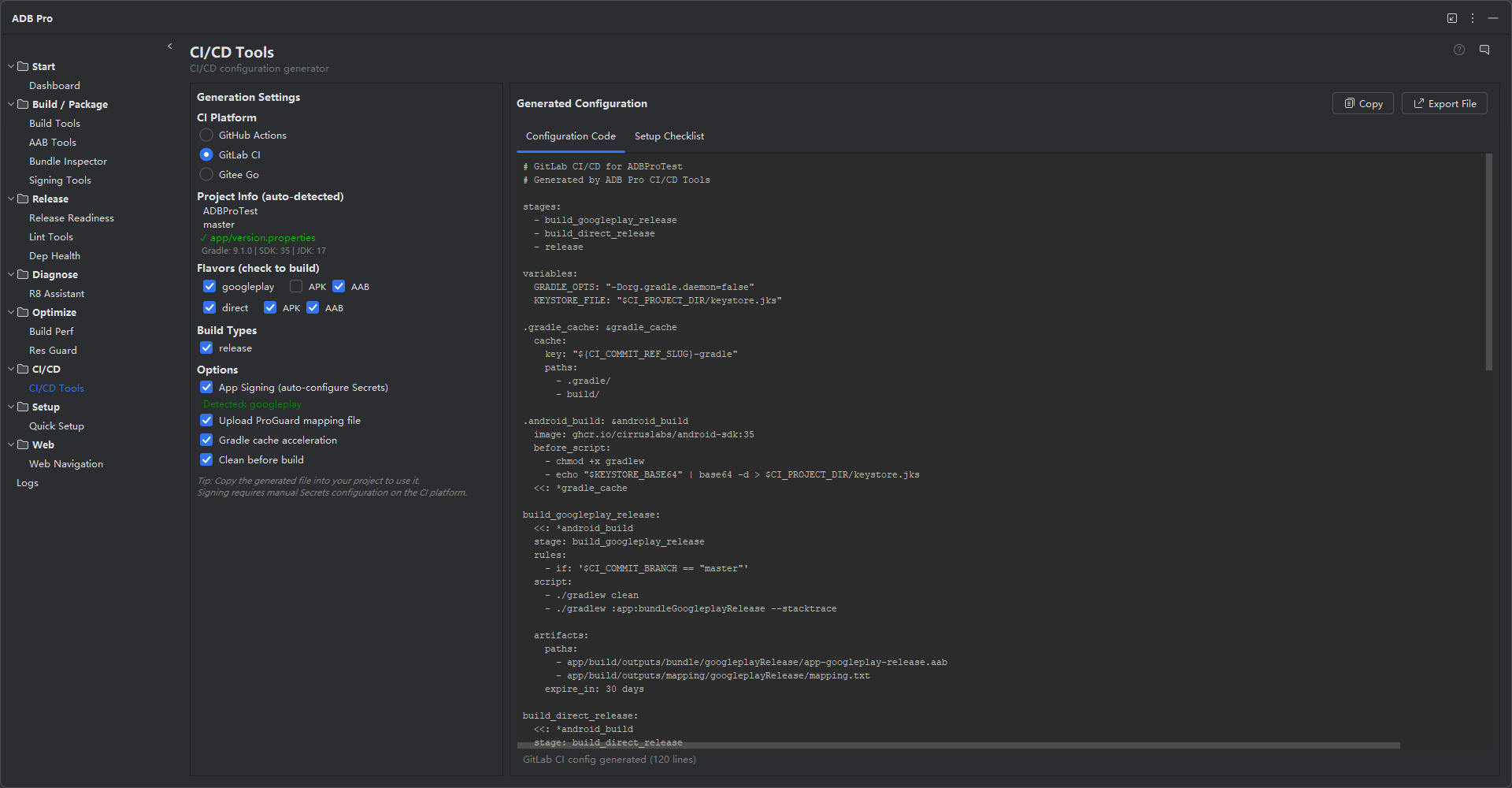
Generate a .gitlab-ci.yml file with stages for build, test, lint, and deploy. The pipeline uses the correct Docker image for your Android SDK version, configures Gradle caching with the GitLab CI cache mechanism, and includes stages for running unit tests and generating build artifacts. For projects with multiple flavors, each flavor can get its own build job running in parallel.
Jenkins Generation
Generate a declarative Jenkinsfile with stages for checkout, environment setup, build, test, and archive. The pipeline includes proper Android SDK tool installation via the Jenkins Android Emulator plugin, Gradle wrapper invocation, and artifact archiving. Signing keystore credentials are referenced via Jenkins credential bindings rather than hardcoded into the pipeline.
Auto-Detection of Build Variants and Signing Configs
CI/CD Tools parses your Gradle files to detect all available build variants and signing configurations. The generation dialog pre-populates pipeline jobs based on what it finds — if you have freeDebug, freeRelease, paidDebug, and paidRelease variants, the generated config includes jobs for each (or lets you select which to include). Signing configs detected in build.gradle are mapped to CI environment variables so secrets stay out of the config file.
Customizable Templates
The generation dialog provides a live preview of the configuration file with editable fields. Adjust JDK distribution (Temurin, Zulu, Corretto), add custom environment variables, insert pre-build or post-build scripts, change the Gradle version, or add Firebase App Distribution steps. The preview updates in real time as you modify options, so you can review the final output before generating.
Mapping File Upload
When code shrinking is enabled, the generated pipeline includes a step to upload the mapping.txt file as a build artifact. This is critical for deobfuscating production crash reports —without the mapping file, stack traces from R8/ProGuard-obfuscated builds are unreadable. The mapping upload step runs automatically after a successful release build and stores the file alongside the APK/AAB artifacts. For GitHub Actions, it uses actions/upload-artifact; for GitLab CI, it adds the mapping to the job artifacts; for Jenkins, it archives the file in the build results.
Output Type Selection
Choose whether your CI pipeline produces APKs, AABs, or both. When "Both" is selected, the generated config includes separate build steps for assemble and bundle tasks with independent artifact upload paths. This mirrors the common release workflow where the AAB goes to the Play Store and a universal APK is distributed internally or via alternative channels.
Custom Secret Names
Signing credentials are referenced as CI/CD secrets rather than hardcoded values. ADB Pro lets you customize the secret names used in the generated config: keystore file (KEYSTORE_BASE64), keystore password (KEYSTORE_PASSWORD), key alias (KEY_ALIAS), and key password (KEY_PASSWORD). This allows you to match your organization's existing secret naming conventions or comply with security team requirements.
Branch Configuration
Configure which Git branches trigger the build pipeline. The default is master, but you can set any branch name or pattern. For GitHub Actions, this maps to the on.push.branches trigger; for GitLab CI, it becomes a only: refs filter; for Jenkins, it configures the SCM branch specifier. Pull request triggers and tag-based triggers are also configurable.
Generated GitHub Actions Example
on:
push:
branches: [ main, develop ]
pull_request:
branches: [ main ]
jobs:
build:
runs-on: ubuntu-latest
steps:
- uses: actions/checkout@v4
- name: Set up JDK 17
uses: actions/setup-java@v4
with:
distribution: temurin
java-version: 17
- name: Cache Gradle
uses: actions/cache@v4
with:
path: ~/.gradle/caches
key: gradle-${{ hashFiles('**/*.gradle*') }}
- name: Build Release
run: ./gradlew assembleRelease
- name: Upload APK
uses: actions/upload-artifact@v4
with:
name: app-release
path: app/build/outputs/apk/release/*.apk
Supported Platforms
| Platform | Config File | Caching | Signing Support | Artifact Upload |
|---|---|---|---|---|
| GitHub Actions | .github/workflows/*.yml | actions/cache | Repository secrets | upload-artifact |
| GitLab CI | .gitlab-ci.yml | CI cache | CI/CD variables | artifacts:paths |
| Jenkins | Jenkinsfile | Workspace cache | Credential bindings | archiveArtifacts |
Getting Started
CI/CD Tools can be triggered from several entry points in your IDE:
- Tools > ADB Pro > Generate CI/CD Config... — opens the generation dialog
- ADB Pro side panel — click the "CI/CD Tools" tab
- Right-click your project root and select "Generate CI/CD Pipeline"
Once the dialog opens, follow these steps:
- Select the target CI/CD platform (GitHub Actions, GitLab CI, or Jenkins).
- Review the auto-detected build variants and signing configs. Uncheck any variants you do not want included.
- Configure trigger events, JDK distribution, and optional stages (test, lint, deploy).
- Review the live preview. Edit any fields as needed.
- Click Generate. The config file is written directly to the correct location in your project (e.g.,
.github/workflows/for GitHub Actions).
To customize default behavior, go to Settings > Tools > ADB Pro > CI/CD Tools. Here you can set the default JDK distribution and version, default trigger events, whether to include test and lint stages, custom pre-build and post-build script snippets, and Firebase App Distribution integration.
Verification
After generating your CI/CD configuration, confirm everything works correctly:
- The generated file is valid YAML (or valid declarative Groovy for Jenkins). Use a YAML linter or the platform's own validation to check syntax.
- Pushing the config file to your repository triggers the pipeline automatically on the configured events (push, pull request, or tag).
- The build succeeds in the CI environment without manual intervention — JDK setup, SDK installation, Gradle caching, and artifact upload all work as expected.
- Build variants and signing configurations in the CI output match what you see in local builds.
- Secrets (keystore passwords, API keys) are sourced from CI environment variables or credential bindings, not hardcoded in the config file.