Introduction
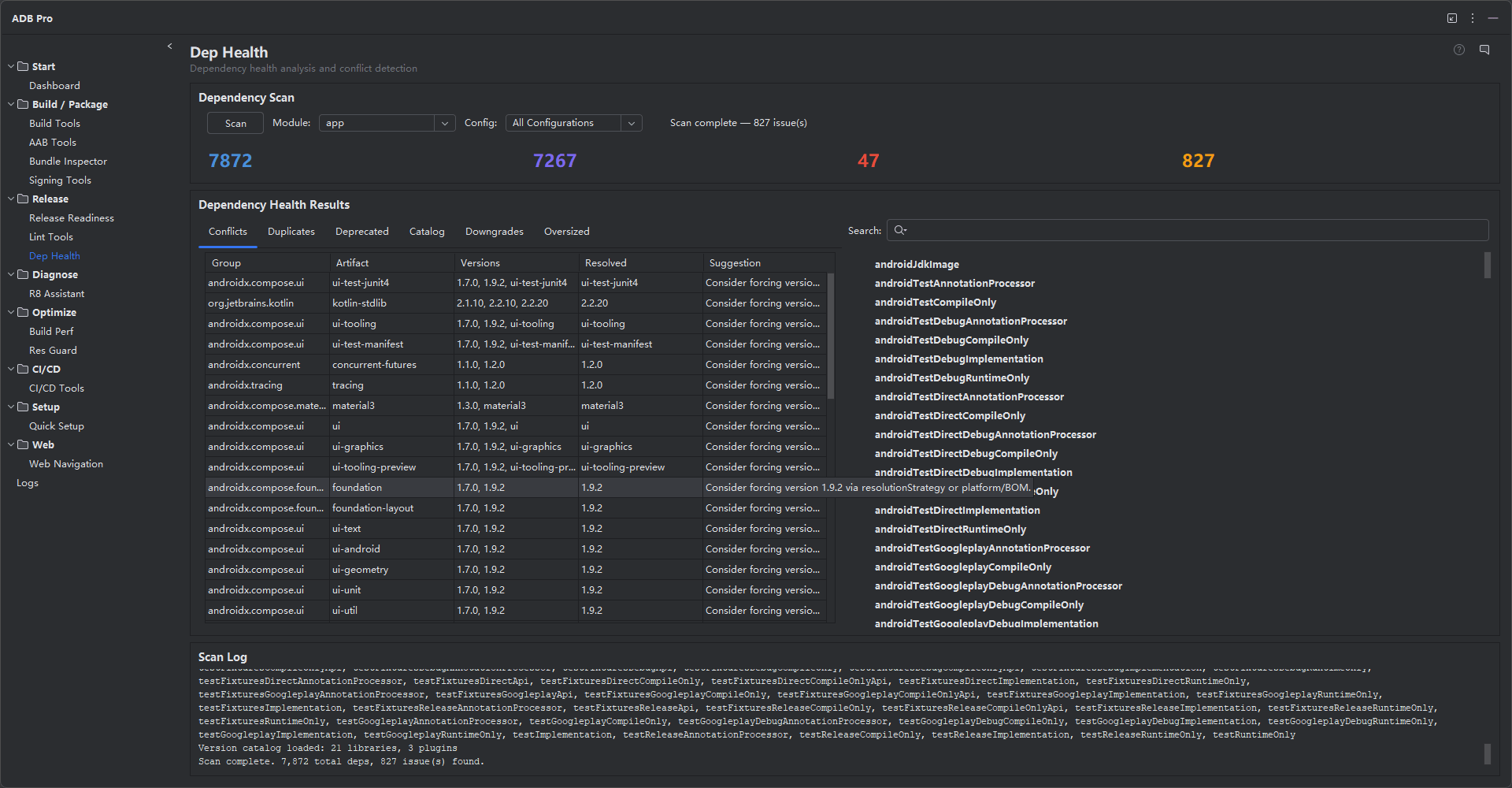
Dependency Health provides full dependency tree analysis for your Android project. It runs ./gradlew dependencies under the hood, parses the full resolution tree, and surfaces problems that Gradle silently resolves —version conflicts, duplicate artifacts, deprecated libraries, and outdated catalog entries.
Modern Android projects accumulate hundreds of transitive dependencies. Dependency Health gives you a single dashboard to understand what your app actually depends on, what needs attention, and how to resolve issues before they cause runtime failures. It also includes a visual editor for Gradle version catalogs (libs.versions.toml) so you can manage library versions without hand-editing TOML files.
Why Use Dependency Health?
Dependency problems are often invisible until they cause a crash in production. Here are the issues that Dependency Health catches early:
- Dependency conflicts cause mysterious runtime crashes. When two libraries request different versions of the same artifact, Gradle silently picks the highest version —which may not be compatible with both callers, leading to
NoSuchMethodErrororClassNotFoundExceptionat runtime. - Duplicate dependencies bloat APK size. The same library appearing under different group IDs or as both direct and transitive dependencies wastes space and can cause classpath conflicts.
- Deprecated libraries have security vulnerabilities. Libraries like the legacy Support Library,
kotlin-android-extensions, and sunset Google Play Services modules no longer receive security patches. - Version catalogs (
libs.versions.toml) are hard to maintain manually. Tracking which versions are outdated across dozens of entries is tedious and error-prone without tooling.
Features
Dependency Tree Display
View the complete dependency tree for any configuration —implementation, debugImplementation, releaseImplementation, androidTestImplementation, and their transitive closures. The tree is displayed in a collapsible panel with color-coded nodes: direct dependencies in bold, transitive dependencies indented, and resolved conflicts highlighted. Search and filter to find any artifact in the tree instantly.
Conflict Detection
Gradle resolves version conflicts by picking the highest version, but that does not always mean the right version. Dependency Health shows every conflict —where two paths in the tree request different versions of the same artifact —along with which version Gradle selected and which was rejected. For each conflict, ADB Pro suggests whether to add an explicit constraint, align versions, or investigate compatibility.
1. com.google.code.gson:gson
Requested: 2.10.1 (by retrofit2:converter-gson:2.9.0)
Requested: 2.8.9 (by com.google.firebase:firebase-common:20.3.0)
Resolved: 2.10.1 (highest version wins)
Suggestion: Add explicit constraint to libs.versions.toml
2. org.jetbrains.kotlin:kotlin-stdlib
Requested: 2.0.21 (by project)
Requested: 1.9.22 (by com.squareup.moshi:moshi-kotlin:1.15.0)
Resolved: 2.0.21 (highest version wins)
Suggestion: Safe —Kotlin stdlib is backward compatible
3. androidx.annotation:annotation
Requested: 1.8.0 (by androidx.core:core-ktx:1.13.1)
Requested: 1.7.1 (by com.google.android.material:material:1.11.0)
Resolved: 1.8.0 (highest version wins)
Suggestion: No action needed
Duplicate Identification
The same library appearing under different group IDs or as both a direct and transitive dependency wastes APK size and can cause classpath issues. Dependency Health identifies duplicate artifacts (same functionality pulled via different coordinates) and suggests exclusions to keep your classpath clean. This is common when migrating between library ecosystems, such as moving from the old Support Library to AndroidX.
Deprecation Warnings
Dependency Health cross-references your dependencies against known deprecation notices. Libraries like the legacy Support Library, deprecated Kotlin extensions (kotlin-android-extensions), and sunset Google Play Services modules are flagged with a recommendation for their modern replacement. The deprecation database is updated with each ADB Pro release.
Downgrade Detection
Gradle sometimes resolves a dependency to a version lower than what you requested —typically when a platform BOM or resolution strategy forces an older version. Dependency Health detects every downgrade by comparing the requested version against the resolved version in Gradle's output (the oldVersion -> newVersion notation). Each downgrade entry shows the artifact, the version you asked for, the version Gradle actually resolved, and which rule or BOM forced the downgrade. Downgrades are dangerous because they may introduce API incompatibilities with code that targets the newer version.
Oversized Dependency Detection
Some libraries pull in an unexpectedly large number of transitive dependencies —a single implementation declaration can add 30+ transitive artifacts to your classpath. Dependency Health identifies these "oversized" root dependencies and reports their transitive fan-out count. This helps you understand which libraries are responsible for APK bloat and whether lighter alternatives exist. For example, pulling in the full Google Play Services monolith instead of the specific module you need can add megabytes to your APK.
Catalog Issue Detection
When your project uses a Gradle version catalog (libs.versions.toml), Dependency Health scans for three categories of catalog hygiene issues:
| Issue Type | Description | Suggestion |
|---|---|---|
| Unused Version | A version key declared in the [versions] section that no library or plugin references |
Remove the unused version entry from the TOML file |
| Hardcoded Version | A library or plugin entry with an inline version string instead of a version.ref |
Extract the version into [versions] for centralized management |
| Missing Entry | A dependency used in build.gradle that is not declared in the version catalog |
Add the dependency to the catalog to centralize version management |
Exclusion Rule Generator
For every conflict and duplicate detected, Dependency Health can auto-generate Gradle exclusion rules. The generator analyzes dependency paths to determine which transitive dependency should be excluded, then produces ready-to-paste code in either Kotlin DSL or Groovy DSL format. For conflicts, it keeps the desired resolved version and suggests excluding the conflicting artifact from the paths that pull in the wrong version. For duplicates, it keeps the shortest (primary) path and suggests excluding from all other paths.
implementation("com.squareup.retrofit2:converter-gson:2.9.0") {
exclude(group = "com.google.code.gson", module = "gson")
}
// Exclusions generated for: androidx.annotation:annotation duplicate
implementation("com.google.android.material:material:1.12.0") {
exclude(group = "androidx.annotation", module = "annotation")
}
Version Catalog Management
If your project uses a Gradle version catalog (libs.versions.toml), Dependency Health provides a visual editor for it. View all declared versions, libraries, bundles, and plugins in a table. Sort by version age to find the most outdated entries. ADB Pro checks for newer stable versions and shows an update indicator next to each entry. Click to update the version in place —the TOML file is edited directly with proper formatting preserved.
| Alias | Group:Artifact | Current Version | Latest Stable | Status |
|---|---|---|---|---|
androidx-core-ktx |
androidx.core:core-ktx | 1.13.1 | 1.15.0 | Update available |
retrofit |
com.squareup.retrofit2:retrofit | 2.11.0 | 2.11.0 | Up to date |
kotlin-stdlib |
org.jetbrains.kotlin:kotlin-stdlib | 2.0.21 | 2.1.0 | Update available |
material |
com.google.android.material:material | 1.12.0 | 1.12.0 | Up to date |
Dependency Diff
Compare the dependency tree of your current build against a previously analyzed build. The diff view shows newly added dependencies, removed dependencies, and version changes. This is invaluable during code review —when a PR changes dependencies, you can see exactly what was added, removed, or upgraded and assess the impact on APK size and compatibility.
Getting Started
Scan and manage your dependencies from these entry points:
- Open the Dependency Health tab in the ADB Pro side panel.
- The panel runs a full dependency tree analysis, parsing the resolution tree and highlighting conflicts, duplicates, and deprecations.
- Review the conflict report and apply suggestions —add explicit constraints to your version catalog or investigate compatibility for flagged items.
- Open the version catalog editor by clicking the "Catalog Editor" gutter icon when viewing
libs.versions.toml, or from the panel toolbar. - Use "Compare with previous analysis" from the panel toolbar to see a dependency diff after a library upgrade.
Additional entry points:
- Tools > ADB Pro > Analyze Dependencies —runs a full dependency tree analysis
- Version catalog —open
libs.versions.tomland click the "Catalog Editor" gutter icon
Configure Dependency Health at Settings > Tools > ADB Pro > Dependency Health:
- Configurations to analyze (default:
releaseRuntimeClasspath) - Artifact exclusion patterns (ignore known transitive conflicts)
- Deprecation check frequency (on-demand or automatic on project sync)
- Version catalog file path (auto-detected by default)
- Update check scope (stable only, or include release candidates)
Verification
After scanning dependencies and resolving issues, confirm that your dependency tree is healthy:
- Conflict report shows zero unresolved conflicts —all version conflicts have been addressed with explicit constraints or exclusions.
- No deprecated dependencies are highlighted in red —all flagged libraries have been replaced with their modern equivalents.
- Your
libs.versions.tomlversion catalog file is up to date, with no stale entries showing "Update available" status. - Dependency diff after a library upgrade shows only the expected additions and removals —no unexpected transitive changes.
- Duplicate identification report is clean —no artifacts appear under multiple coordinates in your classpath.
References
Official documentation for Gradle dependency management: