Introduction
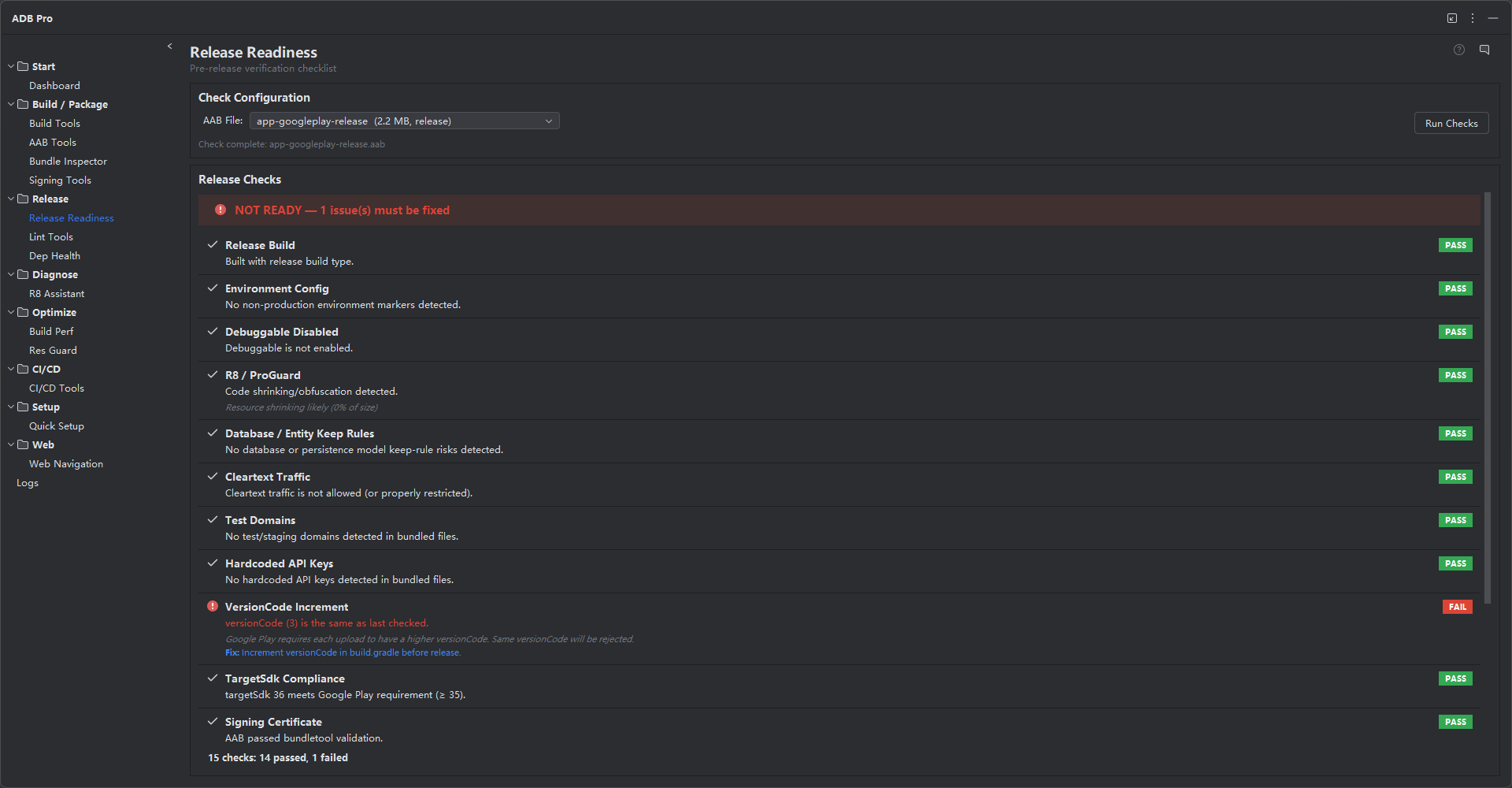
Release Readiness is an automated pre-release checklist that verifies your app is ready for production deployment. Each check inspects your project configuration, manifest, build outputs, signing identity, bundle metadata, and dependencies to produce a clear pass/fail/warning result with actionable details.
Instead of relying on manual checklists that get skipped under deadline pressure, Release Readiness runs the checks in a single pass and presents a consolidated report. It catches the misconfigurations, security issues, compatibility risks, and policy violations that commonly slip through before a release reaches the Play Store.
Why Use Release Readiness?
Pre-release mistakes are costly —they reach production users before you can react. Here are the problems that Release Readiness solves:
- Forgetting to disable
debuggable. A debuggable release build exposes your app to security risks and is automatically rejected by the Play Store, yet it is one of the most common oversights. - Leaving API keys hardcoded in source code. Secrets for Google Maps, Firebase, AWS, and third-party SDKs get committed to repositories and shipped in APKs where anyone can extract them.
- Not enabling
minifyEnabled. Unminified release builds are larger, slower to install, and expose your source code to reverse engineering. - Wrong target SDK version. Google periodically raises the minimum target SDK for new submissions. Missing the requirement means your app update is rejected.
- Manual checklists are error-prone and get skipped under deadline pressure. Even experienced developers miss items when rushing to meet a release date, and paper checklists leave no audit trail.
Features
Release Readiness runs automated checks, each targeting a specific aspect of release configuration:
1. Debuggable Flag Check
Verifies that android:debuggable is set to false in the release build. Also scans for BuildConfig.DEBUG usage that may inadvertently enable debug behavior in production.
2. MinifyEnabled Verification
Confirms that code shrinking (R8/ProGuard) is enabled via minifyEnabled true for the release build type, along with resource shrinking (shrinkResources true) status.
3. API Key Exposure Scan
Scans source code and resource files for hardcoded API keys, secrets, and tokens using pattern matching. Detects common patterns for Google Maps keys, Firebase config values, AWS credentials, and third-party SDK tokens.
4. SDK Version Compliance
Validates that targetSdkVersion meets current Google Play requirements and that compileSdkVersion is sufficient for the libraries in use. Flags deprecated API usage.
5. Signing Configuration
Ensures the release build is signed with a proper release keystore —not the debug keystore. Checks for v2 or v3 APK Signature Scheme (required for Play App Signing) and keystore certificate validity.
6. ProGuard Rules Review
Verifies that ProGuard/R8 rules files exist and are properly referenced. Flags missing -keep rules for reflection-heavy libraries and overly broad wildcard rules.
7. Version Code and Name
Reviews versionCode and versionName consistency. Local scan history is treated as a warning-level signal because a same versionCode can be valid before upload; the real blocking baseline is the versionCode already accepted by the target app store.
8. Target SDK Version
Goes beyond basic SDK compliance by checking runtime permission behavior changes, background execution limits, and platform-level requirements introduced in recent Android versions.
9. Permissions Review
Lists all declared permissions and highlights sensitive ones (location, camera, microphone, contacts, phone state). Flags permissions that lack corresponding runtime request code and detects unused permissions.
10. Test Coverage
Checks for the presence of test source sets and optionally runs unit tests to verify they pass. Reports whether tests exist, whether they pass, and the last execution timestamp.
11. Resource Optimization
Verifies that resource shrinking is enabled, checks for unused resources, and flags large image assets that could benefit from WebP conversion or vector drawable replacement.
12. Manifest Checks
Validates critical manifest attributes: android:allowBackup, android:usesCleartextTraffic, android:exported on all components (required on Android 12+), and android:networkSecurityConfig presence.
13. Dependency Audit
Scans the dependency tree for known vulnerabilities using public CVE databases. Flags outdated dependencies with available security patches, snapshot versions, and conflicting transitive dependencies.
16 KB Native Library Page Size
Checks native libraries for Android 15+ 16 KB page-size compatibility risks. This helps teams catch native dependency packaging issues before testing on newer devices where incompatible native libraries can fail to load.
Remote AAB Release Candidate Checks
Release Readiness can run against local build outputs or remote AAB artifacts downloaded from configured repositories. Remote repository cache metadata is treated as the artifact source, not as the build type, so a production remote AAB is still evaluated as a release candidate when its manifest and metadata match release expectations.
Documentation Links for Each Check
Each check can expose a documentation link next to the result status. This makes warnings and failures easier to explain during release review because developers can jump from a finding to the official or project-specific guidance behind that check.
Check Status Types
Each check produces one of five status levels: PASS for checks that passed cleanly, INFO for informational notes that require no action, WARNING for items that are not blocking but should be reviewed (e.g., permissions that are declared but never requested at runtime), FAIL for critical issues that must be resolved before release, and SKIP for checks that could not be evaluated (e.g., no test source set found, or no Git history available). The overall readiness score counts only PASS checks, making it easy to see at a glance whether your build is ready to ship.
Check History
Release Readiness results are persisted between scans, so you can compare readiness across builds and track improvements over time. The history view shows a timeline of past scans with pass/fail/warning counts for each. This is especially useful during release cycles —you can verify that the number of warnings is decreasing with each build and that no new failures have been introduced by recent changes.
Score: 14 / 16 passed
[PASS] Debuggable flag is false
[PASS] minifyEnabled is true
[PASS] No hardcoded API keys detected
[PASS] targetSdkVersion 35 meets Play requirement
[PASS] Signed with release keystore (v2 + v3)
[PASS] ProGuard rules present and referenced
[WARNING] versionCode matches the last local scan; confirm store upload history
[PASS] Target SDK behavioral changes handled
[FAIL] 3 permissions lack runtime request code
[PASS] Unit tests present and passing (342 tests)
[PASS] Resource shrinking enabled
[FAIL] android:exported missing on 2 activities (Android 12+)
[PASS] No known CVEs in dependency tree
[PASS] Native libraries are compatible with 16 KB page-size devices
Getting Started
Run the Release Readiness check from any of these entry points:
- Tools > ADB Pro > Run Release Readiness Check —runs the full release checklist
- ADB Pro side panel —click the "Release Readiness" tab and press "Run Check"
- Post-build hook —optionally configure the check to run automatically after every release build
Interpreting results:
- Review the overall score at the top of the report (for example, passed checks, warnings, and failures).
- Each item shows a status indicator such as [PASS], [WARNING], or [FAIL] with a description.
- Click on any failed item to navigate directly to the source location in your editor.
- Each failed or warning item includes a description of the issue, the affected file or configuration, a suggested fix, and a documentation link when guidance is available.
Additional configuration is available at Settings > Tools > ADB Pro > Release Readiness, where you can:
- Enable or disable individual checklist items (e.g., skip test coverage for internal builds)
- Set custom API key patterns for the exposure scan
- Override the minimum required targetSdkVersion
- Enable auto-run on release build completion
- Set severity threshold for blocking release (require all pass, or allow warnings)
Verification
After running the Release Readiness check, confirm that your project is truly release-ready:
- Critical items should show green checkmarks, and warning items should be reviewed before upload.
- Any red [FAIL] items include specific remediation steps. Apply the suggested fixes and re-run the check.
- After fixing failures, run a release build and install the APK on a device to verify behavior matches the report.
- Re-run the check after any build configuration change to catch regressions before they ship.
References
Official documentation for preparing and publishing Android apps: