Introduction
Resource Obfuscation (Res Guard) integrates AabResGuard directly into your IDE workflow. AabResGuard is a tool that obfuscates Android resource names in AAB/APK files, replacing readable resource identifiers (like ic_launcher_background or strings_app_name) with short, meaningless names. This reduces APK size by removing redundant string data in the resource table and adds a layer of protection against reverse engineering.
ADB Pro manages the entire AabResGuard lifecycle: downloading and managing the AabResGuard JAR, copying the selected JAR into the Android project's Gradle plugin directory when needed, configuring whitelist rules and filter options, injecting the Gradle plugin configuration into your build.gradle.kts, and executing the obfuscation task. Everything is controlled from a single tab with three sub-sections: JAR Management, Configuration, and Execution.
Why Use Resource Obfuscation?
Without resource obfuscation, Android apps expose more than most developers realize. Here are the common pain points:
- Resource name exposure — Without obfuscation, all resource names (drawables, strings, layouts) are fully readable in the APK. Reverse engineers can infer app structure and business logic from resource names alone.
- Bloated resource tables — Android resource tables store full string identifiers for every resource. Projects with hundreds of drawables and string resources carry significant overhead from long, descriptive names.
- Manual AabResGuard setup — Setting up AabResGuard requires downloading the JAR, configuring Gradle classpath entries, writing whitelist rules for resources that must not be renamed (launcher icons, notification icons, Firebase resources), and debugging configuration errors.
- Whitelist maintenance — Third-party SDKs often reference resources by name at runtime. Missing a whitelist entry for a Firebase Crashlytics resource or a notification icon causes silent runtime failures that only appear in production.
- No IDE integration — Without ADB Pro, AabResGuard is a standalone command-line tool. You have to manually invoke it, manage configuration files, and check output logs outside the IDE.
Features
JAR Management
Res Guard automatically downloads and manages the AabResGuard JAR file. The JAR Management tab shows the current version, download status, and file location. If the JAR is missing or outdated, a single click downloads the latest version. The JAR path is persisted as an application-level setting, so it's shared across all projects.
Project Gradle Plugin Copy
When a project needs the AabResGuard plugin JAR inside the repository, Res Guard can copy the selected JAR to gradle/plugins/aabresguard/ under the Android project root. It then updates matching build.gradle or build.gradle.kts references to the copied JAR path. Older JARs are kept in place instead of being deleted, so teams can roll back quickly if a plugin upgrade causes build issues.
Visual Configuration
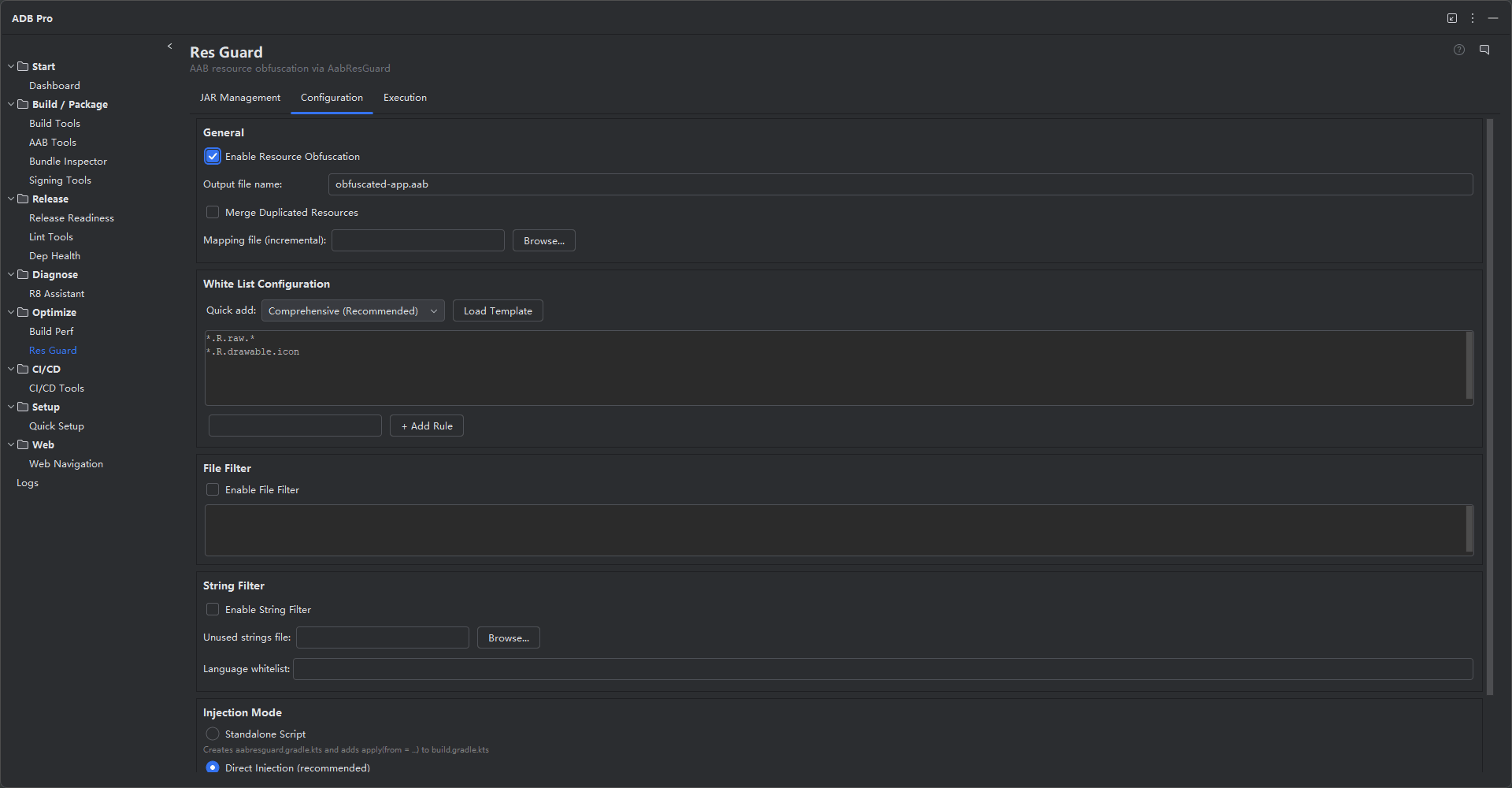
The Configuration tab provides a visual editor for AabResGuard settings. Configure whitelist rules organized by resource type (raw, drawable, mipmap, string, xml), enable or disable file and string filtering toggles, and set up SDK-specific whitelist entries. The configuration is written as a Gradle configuration block that AabResGuard reads during the build process.
SDK-Linked Whitelist Rules
When third-party SDKs are configured (via Quick Setup or manually), Res Guard automatically adds the necessary whitelist entries. Firebase Analytics, Firebase Crashlytics, Google Ads, Pangle, Facebook SDK, and notification resources each have predefined whitelist patterns. This prevents the common mistake of obfuscating resources that SDKs reference by name at runtime.
Gradle Injection
Res Guard can inject the AabResGuard Gradle plugin configuration directly into your build.gradle.kts. The Gradle injector analyzes your existing build file structure, detects the correct insertion point, and writes the classpath dependency and plugin application block. If an existing AabResGuard configuration is detected, the tool updates it rather than creating a duplicate.
Execution and Logging
The Execution tab runs the AabResGuard obfuscation task and displays real-time execution output. You can see the obfuscation progress, any warnings about resources that were skipped, and the final output size comparison. The execution log is timestamped and persisted for reference.
Local JAR Import
In addition to automatic download, you can import an AabResGuard JAR from a local path. This is useful when working in environments without internet access, using a custom fork of AabResGuard, or when your organization hosts the JAR on an internal artifact server. Imported JARs are tracked with the same version metadata as downloaded ones, so update detection still works.
Merge Duplicated Resources
Enable the mergeDuplicatedRes toggle to instruct AabResGuard to deduplicate identical resource files before obfuscation. When multiple drawable or raw resources share the same content but have different names, they are merged into a single resource entry. This can significantly reduce the resource table size in projects with duplicated assets across flavor-specific resource directories.
File Filtering
When file filtering is enabled, AabResGuard only obfuscates resources with the specified file extensions. By default, common resource extensions like .png, .webp, and .xml are included. You can customize the filter list to include or exclude specific extensions —for example, excluding .json files that are loaded dynamically at runtime by name.
Unused String Filtering
Enable string filtering to remove unused string resources from the final output. When paired with an unused-string list file, AabResGuard strips string entries that are not referenced by any layout, code, or configuration resource. This is particularly effective for apps with large localization files where many string keys are defined but never used.
Language Whitelist
When string filtering is active, the language whitelist prevents specific locale string files from being stripped. For example, whitelisting en and zh ensures that English and Chinese string resources are preserved even if they appear unused to the static analyzer. This is important for apps that load localized strings dynamically or use string resources selected at runtime based on user preferences.
Variant Selection
AabResGuard obfuscation can target specific build variants. The Gradle analysis step detects all available variants in your project (e.g., release, freeRelease, paidRelease) and presents them for selection. Choose the variant whose AAB output should be obfuscated. The variant selection also controls which Gradle task is invoked —for example, selecting freeRelease runs the AabResGuard task against the bundleFreeRelease output.
Example Configuration
buildscript {
dependencies {
classpath("com.bytedance.android:aabresguard:0.1.10")
}
}
apply(plugin = "com.bytedance.android.aabresguard")
configure<com.bytedance.android.aabresguard.plugin.AabResGuardExtension> {
enableObfuscation = true
obfuscatedBundleName = "app-obfuscated.aab"
whitelist {
// Launcher icons
rule("*/ic_launcher*")
// Firebase resources
rule("*/google_app_id")
rule("*/gcm_defaultSenderId")
rule("*/firebase_crashlytics_collection_enabled")
// Notification icons
rule("*/ic_stat_*")
}
filteredFileExtensions = setOf("png", "webp", "xml")
filteredStringPrefixes = setOf("app_name", "title_")
}
Supported Resource Types
| Resource Type | Whitelist Pattern Example | Common SDKs Needing Whitelist |
|---|---|---|
| drawable | */ic_launcher* |
Firebase, Facebook SDK |
| mipmap | */ic_launcher* |
Launcher, Adaptive icons |
| raw | */google_* |
Firebase Analytics, Crashlytics |
| string | */app_name |
Google Ads, Pangle |
| xml | */network_security_config |
Network security configs |
Getting Started
Res Guard is accessible from the ADB Pro side panel. Follow these steps to set up resource obfuscation:
- Open the ADB Pro side panel and click the "Res Guard" tab.
- In the JAR Management tab, ensure the AabResGuard JAR is downloaded.
- If the project should own the plugin binary, copy the selected JAR into
gradle/plugins/aabresguard/and update the Gradle reference from the IDE. - In the Configuration tab, review and customize whitelist rules for your project.
- Enable or disable file and string filtering as needed.
- Click "Apply Configuration" to inject the Gradle plugin config into your build file.
- In the Execution tab, click "Run AabResGuard" to obfuscate resources.
- Check the execution log for the output size comparison.
Verification
After running AabResGuard, confirm everything works correctly:
- Gradle sync succeeds after AabResGuard plugin injection or after updating the local Gradle plugin JAR path.
- The obfuscated AAB/APK has smaller resource table size than the original.
- Launcher icons and notification icons are not obfuscated (whitelist working).
- Third-party SDK resources (Firebase, ads) function correctly at runtime.
- No
ClassNotFoundExceptionorResources.NotFoundExceptionfor whitelisted resources.