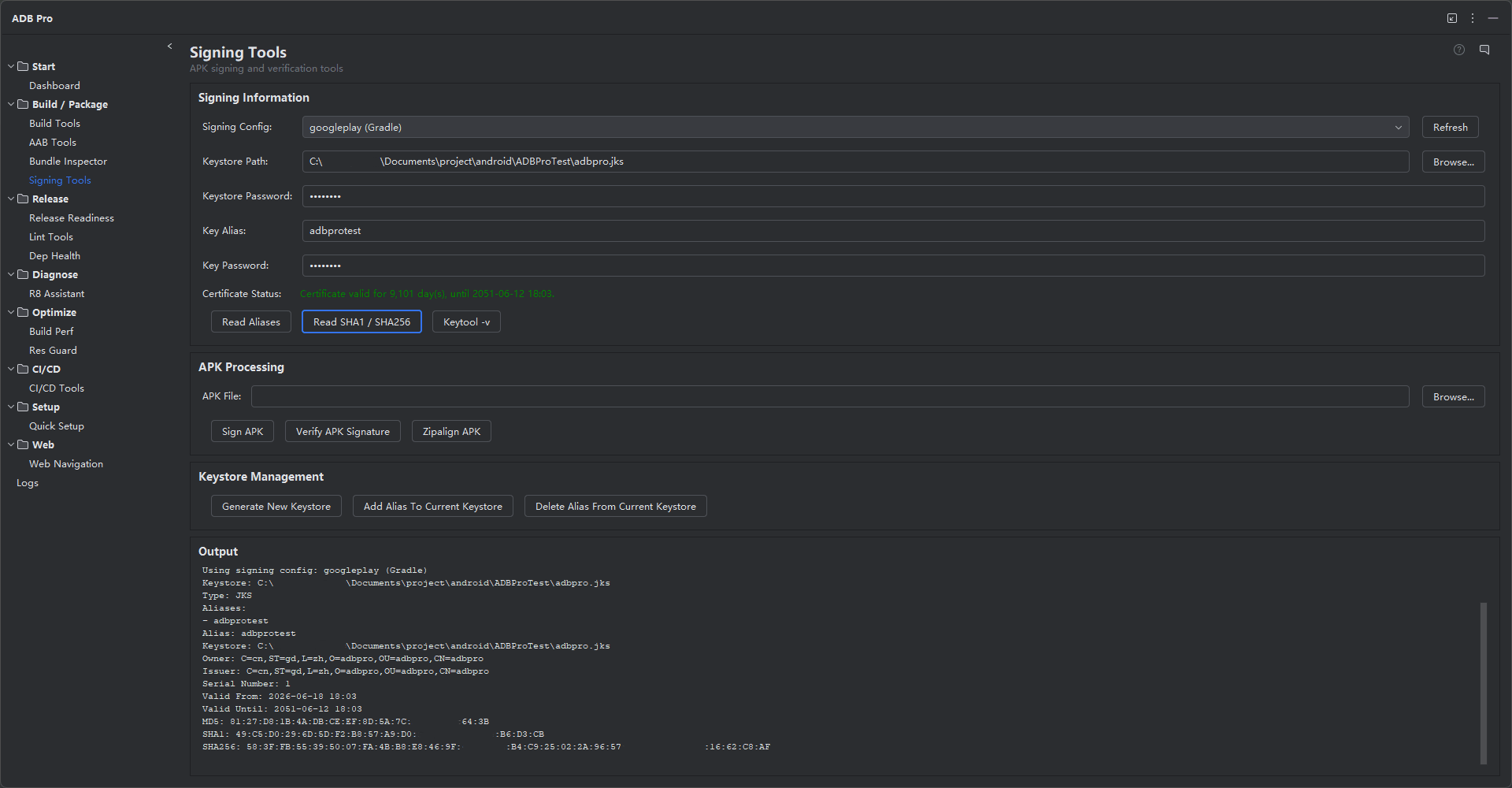
Introduction
Signing Tools provides a complete APK signing toolkit integrated directly into your JetBrains IDE. It supports all three Android signing schemes — v1 (JarSigner), v2 (APK Signature Scheme), and v3 (APK Signature Scheme v3) — and wraps Google's apksigner utility with a streamlined UI that handles scheme selection, zipalign optimization, and signature verification in one place.
APK signing is a mandatory step before any Android app can be installed on a device or submitted to the Play Store. The signing process involves selecting the correct scheme for your target Android versions, ensuring the APK is properly zipaligned, and applying the signature with a valid keystore. Signing Tools manages this entire pipeline, from raw unsigned APK to fully signed and verified output.
Credential security is a key part of the module. All keystore paths, aliases, and passwords are stored through IntelliJ's PasswordSafe API, which encrypts credentials using the IDE's built-in security layer. No passwords are ever written to plain-text files or exposed in command history.
Why Use Signing Tools?
Manual APK signing with command-line tools is fragile and easy to get wrong:
- Error-prone
apksignerusage — The command-line interface requires precise argument ordering (--ks,--ks-key-alias,--ks-pass,--key-pass,--v1-signing-enabled, etc.). A single typo produces a corrupted or unsigned APK with little useful error feedback. - Confusion between v1, v2, and v3 schemes — Each scheme has different minimum Android version requirements and behavior. Developers often sign with v1 only (for legacy compatibility) but forget v2, which is required for faster install verification on Android 7.0+ and mandated by the Play Store.
- Keystore passwords in plain text — Shell scripts and CI configs frequently embed keystore passwords as environment variables or inline arguments, creating a security risk if logs or scripts are accidentally committed or shared.
- Forgotten zipalign step — The Play Store requires zipaligned APKs for optimal device performance. Developers sometimes skip this step when signing manually, leading to store rejections or increased RAM usage on devices.
- No quick verification — After signing, confirming that the correct certificate and schemes were applied requires running
apksigner verify --verbose --print-certsseparately and parsing dense output manually.
Features
APK Signing (v1, v2, v3)
Sign APKs using any combination of signing schemes. The v1 JarSigner scheme provides backward compatibility for devices running Android versions prior to 7.0, while v2 and v3 APK Signature Schemes offer stronger whole-file integrity protection and faster verification on modern Android. ADB Pro uses Google's apksigner under the hood, ensuring full compatibility with the latest Android platform requirements. Select individual schemes or enable all three with a single checkbox.
Signature Verification
Verify the signature of any APK with a single click. The verification report shows which signing schemes are present (v1, v2, v3), certificate chain details including issuer, subject, validity period, and serial number, and whether the signature covers the entire APK contents. This makes it easy to catch signature mismatches or missing schemes before uploading to the Play Store or distributing to testers.
Zipalign Optimization
Run zipalign on unsigned or signed APKs to ensure all uncompressed data starts at a 4-byte boundary. Proper alignment reduces RAM usage on the target device and is a mandatory requirement for Play Store submission. ADB Pro automatically detects misaligned APKs and offers one-click alignment, or you can configure automatic zipalign as a pre-signing step in settings.
Keystore Management
Store keystore paths, key aliases, and passwords securely using IntelliJ's PasswordSafe API. Credentials are encrypted by the IDE and never written to plain-text config files. Switch between multiple keystores — debug, release, enterprise — from a dropdown without re-entering passwords each session. Keystore entries are validated on load to confirm the file still exists and the alias is accessible.
Favorite Signing Configs
Save frequently used signing configurations as named favorites for instant access. Each favorite stores the keystore path, key alias, preferred signing schemes, and zipalign flag. This is especially useful for teams managing multiple app variants, white-label builds, or separate debug and release signing identities. Favorites sync with the IDE project settings for consistent access across team members.
Getting Started
Signing Tools settings are accessible from Settings > Tools > ADB Pro > Signing Tools. From there you can configure:
- Default signing scheme selection (v1 only, v2 only, v1+v2, all schemes)
- Custom
apksignerandzipalignbinary paths (auto-detected from Android SDK by default) - Automatic zipalign before signing (enabled by default)
- Favorite signing configurations and PasswordSafe credential storage
Quick-access actions are available under the Tools > ADB Pro menu: Sign APK, Verify APK Signature, Zipalign APK, and Manage Keystores.
./gradlew assembleRelease
# 2. Open the Signing Tools panel in ADB Pro
# 3. Select the APK from build outputs
# 4. Choose a signing config (or create a new one):
# - Select keystore file
# - Enter key alias
# - Choose signing schemes (v1 + v2 recommended)
# 5. Click "Sign" - ADB Pro handles zipalign + apksigner
# 6. Click "Verify" to confirm the signed APK
Verification
After signing an APK, confirm that everything was applied correctly:
- Run
apksigner verify --verbose --print-certs app.apkand confirm that the output shows the correct signer certificate (CN, OU, O fields match your keystore). - Verify that all expected signing schemes are listed in the output (e.g., "v1 scheme" and "v2 scheme" both show
true). - Run
zipalign -c -v 4 app.apkto confirm the APK passes the alignment check. The exit code should be 0 with "Verification successful" in the output. - Install the signed APK on a device with
adb install app.apkand confirm the app launches without signature-related errors. - Compare the APK's certificate fingerprint (SHA-256) against your keystore's known fingerprint to ensure the correct key was used.
References
- App Signing Documentation — Google's comprehensive guide to APK signing, keystore generation, and Play App Signing.
- apksigner CLI Reference — Complete documentation for all apksigner commands including
sign,verify, androtate. - APK Signature Scheme (AOSP) — Low-level specification of the v2 and v3 signing schemes, including the signed-data block format and key rotation structures.