
Preview the integration
Choose a feature and language. Inspect the component, initialization and setup before adding files.
Code · Initialize · SetupANDROID STUDIO & INTELLIJ IDEA
Generate reusable Kotlin and Java components for Google Play and Firebase. Preview the code. Know the setup. Make it yours.
// A component. Your entry point.
private lateinit var reviews:
    GooglePlayInAppReview

override fun onCreate(state: Bundle?) {
    super.onCreate(state)
    reviews = GooglePlayInAppReview(
        applicationContext
    )
}

fun onMilestoneReached() {
    reviews.requestReview(
        this, onFinished = {}, onFailure = {}
    )
}THE COMPONENT LIBRARY
One place for the integration code,
entry-point examples and official sources.
Google Play
Offer a background download or a full-screen update flow, with the lifecycle code in a reusable component.
// Flexible mode · initialization excerpt
val updates = GooglePlayInAppUpdate(applicationContext)

updates.register {
    // Offer an app-owned "Restart to update" action.
}
updates.checkAndStart(
    updateLauncher,
    onUnavailable = { /* Continue the app flow. */ },
    onFailure = { error -> /* Handle the error. */ }
)

// Unregister the listener when the Activity stops.
updates.unregister()Examples show the initialization boundary. Generated components include the SDK handling; your app supplies the UI, configuration and backend where needed.
FROM TEMPLATE TO YOUR APP
Choose a feature and language. Inspect the component, initialization and setup before adding files.
Code · Initialize · SetupSelect your Android module, package and class name. Review each proposed file in Changes.
Your module. Your naming.Merge the initialization and lifecycle hooks, finish service configuration and sync Gradle.
Reusable Kotlin or JavaRIGHT INSIDE YOUR IDE
Browse integrations, follow the SDK references and compare generated files without leaving your Android project.
Explore the guides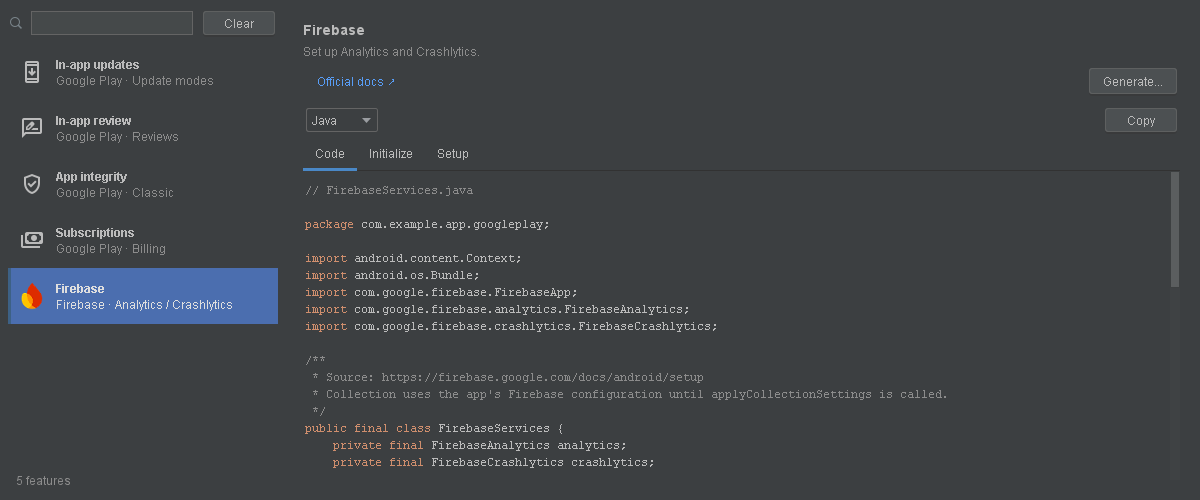
UNDERSTAND THE INTEGRATION
Offer a background download or a full-screen update flow, with the lifecycle code in a reusable component.
Read the guideRequest the Google Play review flow after a meaningful moment in your app, without tying it to your app architecture.
Read the guideGenerate the client side of a Play Integrity Classic request, with a clear boundary for backend verification.
Read the guideSTART WITH THE DOCUMENTATION
Explore the components, prerequisites and examples before the commercial release.